

Connects to




Your AI account
Setup takes a minute
GitHub
Your website's files are kept in your GitHub account. Connect it to yoflow with your browser. Every change made in yoflow, by you or your AI, is kept there with a name and a time.
Cloudflare
Your Cloudflare account publishes the site. If it already publishes from your GitHub, there is nothing more to do. If not, it is set up once, in your account.
Your AI account
Integrate your AI account with yoflow. One or several. From then on you can type what you want and your AI makes the change in yoflow. Nothing goes live until you publish. Pro Flow.
Then ask for what you want
Plain words. Copy one of these to try it with your AI.
Add a Careers page with our three open roles and put it in the menu.
Change the hours on every page to Monday to Friday, 7 to 5.
Write a news post about the new Airdrie office opening on 3 November.
Make the home page photo bigger and the headline shorter.
Add a page for EV charger installs, in the same style as the other service pages.
Fix the broken links the SEO check found.
Nothing goes live until you publish
Every change your AI makes is recorded like any other. You check it in History and you decide when it goes live.
- Shows up in History with the time
- Goes live only when someone with Can publish presses Publish
- Any version can be restored in one click
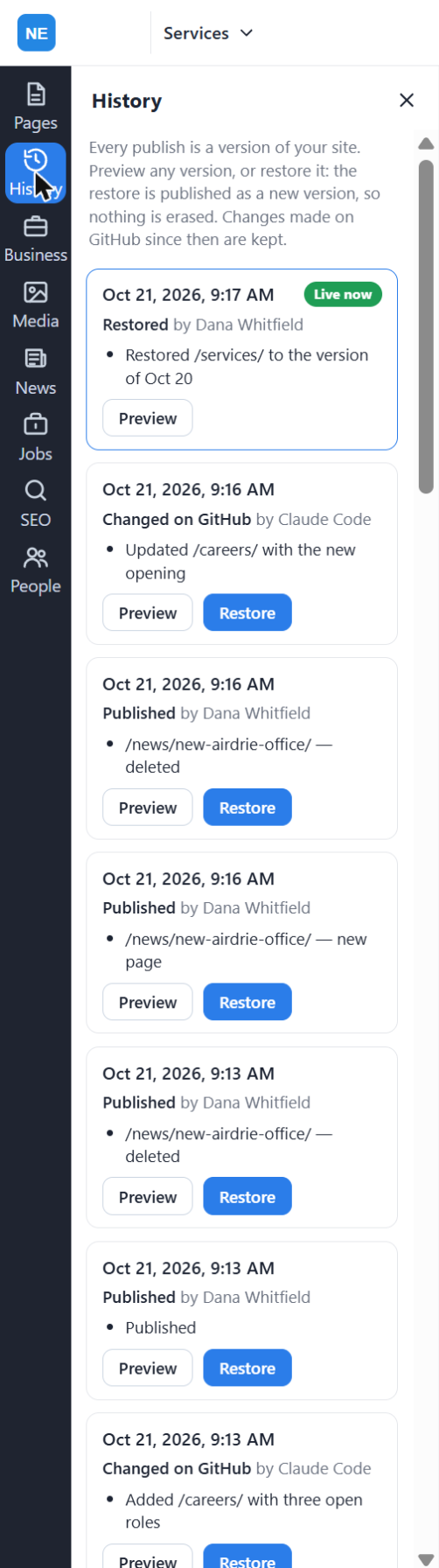
What a session looks like
Questions
Do I need to know how to code?
No. You click the page and change it, or instruct your AI. Nobody writes code.
What do I need to start?
A GitHub account and a Cloudflare account in your name. Both are free to open. For Pro Flow, an AI account.
Is there an API key to paste somewhere?
No. You sign in with your browser. That is the whole connection.
Which AI accounts can I connect?
Major AI accounts, including Claude, ChatGPT, Gemini, Copilot, Perplexity and Mistral. Connect one or several.
Can an agency use its own AI account?
Yes. An agency can integrate its own AI account with a client's site in yoflow. The client can integrate theirs too.
Is it safe to let an AI change my site?
It never changes the live site on its own. The change goes into History and goes live only when someone with Can publish presses Publish. Any version can be restored.
Can I disconnect?
Yes. Disconnect an account and nothing else changes. Your site, its files and its history stay where they are.
Your next change, live today.
Try it free for 14 days. Add your AI when you're ready.
yoflow editor
The yoflow editor: US$9.99 a month for your website, with up to 100 people. 14-day free trial. Card required; cancel before day 14 and you won't be charged. Month to month, cancel any time.
Start free trialPro Flow
The yoflow editor, plus your own AI account integrated for editing and building.
Contact salesAlready using yoflow? Sign in